
Microsoft Just Made AI Agents the Default in Word, Excel, and PowerPoint
Microsoft flipped Copilot Agent Mode on by default for 400M+ Office users. Agents now autonomously edit documents, build spreadsheets, and redesign presentations without asking first.

Reading about AI agents? RapidClaw gives you one that lives in Telegram & Discord, remembers everything, and runs your day — live in 60s, from $19/mo.
Get startedFour hundred million Microsoft 365 users woke up this week to a Copilot that no longer waits for instructions. On April 22, 2026, Microsoft made Agent Mode the default experience in Word, Excel, and PowerPoint across every paid subscription tier — Business, Enterprise, Education, Personal, and Family. No opt-in. No feature flag. No IT ticket. The old "suggest and wait" Copilot is gone. The new one opens your document and starts working.
During the 30-day preview that preceded GA, Excel engagement jumped 67%, retention climbed 50%, and user satisfaction rose 65%. Word saw a 52% increase in tries per user per week. PowerPoint engagement grew 11%, retention 36%, satisfaction 25%. Those numbers convinced Microsoft to skip the gradual rollout and flip the switch for everyone at once.
This is the largest single deployment of autonomous AI agents in history.
What is Copilot Agent Mode?#
Copilot Agent Mode is the new default behavior of Microsoft 365 Copilot in Word, Excel, and PowerPoint. Instead of responding to one prompt at a time and handing you a suggestion to paste in yourself, Agent Mode accepts a goal in natural language, breaks it into a sequence of steps, and executes those steps directly inside your file. It drafts, restructures, reformats, adds formulas, builds charts, redesigns slides, and applies your brand templates — all without you touching the document between steps.
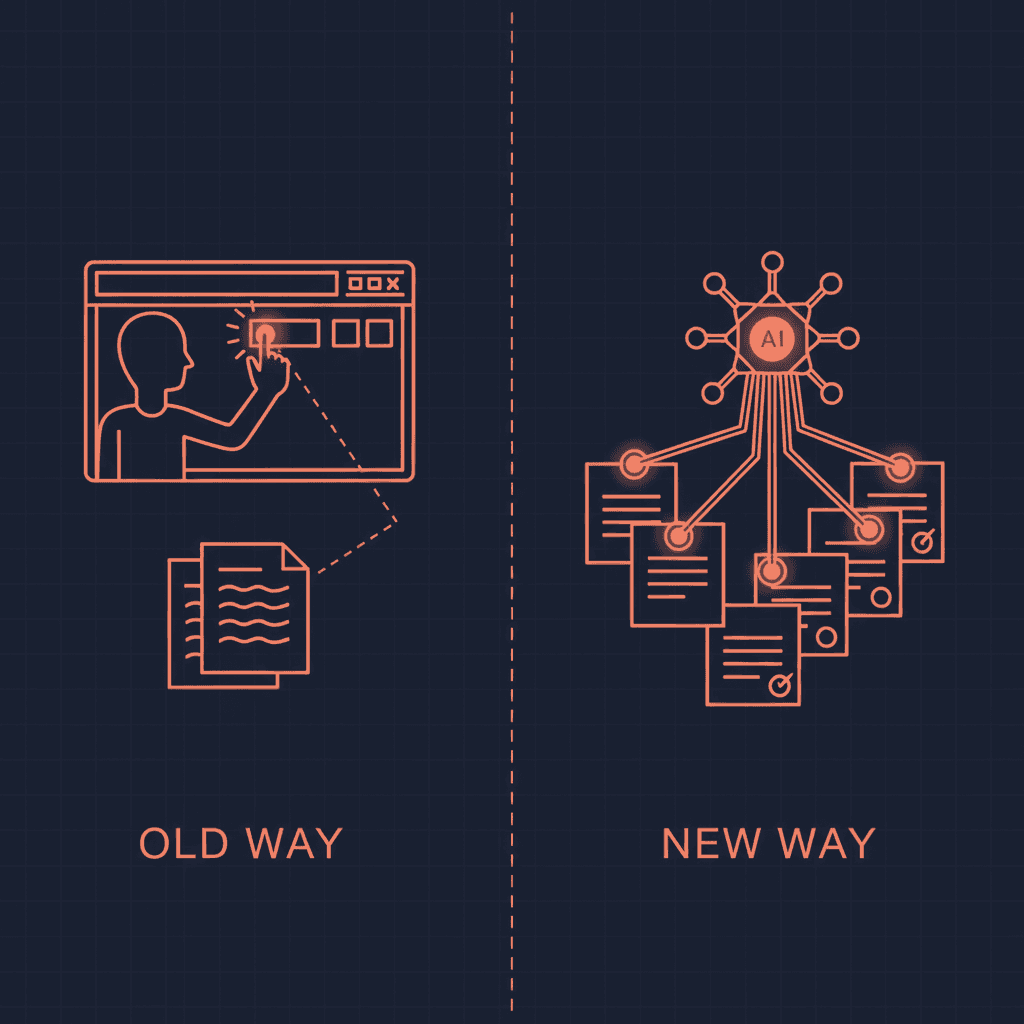
The distinction matters. Old Copilot was a chatbot that lived in a sidebar. You asked a question, got an answer, and manually applied it. Agent Mode is an autonomous worker. You describe an outcome, it shows you a plan, and it does the work. You watch the steps execute in real time through a sidebar that functions like a checklist being ticked off.
Microsoft's framing is telling: "Copilot acts as a true collaborator, taking action while you stay in control." The word "collaborator" is doing heavy lifting there. A collaborator who edits your document without waiting for line-by-line approval is closer to an employee than an assistant.

Old Copilot vs. Agent Mode: what actually changed#
The behavioral shift is more significant than a feature update. Here is what changed across all three apps:
| Capability | Old Copilot | Agent Mode |
|---|---|---|
| Interaction model | One prompt, one response | Multi-step autonomous execution |
| Document editing | Suggests text you paste manually | Writes, restructures, reformats directly |
| Excel formulas | Explains formulas in chat | Creates and inserts formulas in cells |
| Chart creation | Describes what chart to make | Builds and inserts charts in the workbook |
| PowerPoint design | Suggests slide content | Creates slides, applies templates, adds transitions |
| Cross-reference | Limited to current file | Pulls content from referenced files and emails |
| Brand compliance | Manual template application | Auto-applies company templates and styles |
| User involvement | Required at every step | Reviews plan, then watches execution |
| Default state | Chat sidebar | Agent Mode (chat available as fallback) |
The underlying model upgrade matters too. Microsoft rolled GPT-5.5 into the Copilot stack alongside Agent Mode, which gives the system stronger reasoning for multi-step planning and better accuracy when working with numerical data in Excel.
How Agent Mode works in each app#
Word: from blank page to polished document#
Agent Mode in Word handles the full drafting lifecycle. Give it a goal — "write a project proposal for the Q3 infrastructure migration, formal tone, include budget estimates from the attached spreadsheet" — and it produces a structured document with headings, sections, citations, and formatting that matches your organization's Word styles.
The key difference from the old experience: it doesn't generate a block of text in the sidebar for you to copy. It writes directly into the document, applying native Word styles as it goes. It can pull content from files you reference, emails in your Outlook, and previous documents in your OneDrive. When it rewrites a section, the changes appear in the document in real time.
For teams that produce high volumes of reports, briefs, and proposals, this collapses a multi-hour workflow into minutes. But the Office Watch analysis has a useful caution: treat it as "a very fast editor who occasionally invents facts." Verify before you send.
Excel: autonomous formulas, tables, and analysis#
Excel is where Agent Mode shows the most dramatic shift. Old Copilot would explain a VLOOKUP in the chat pane. Agent Mode writes the VLOOKUP, inserts it into the correct cell, validates the output, and moves on to the next step in your analysis.
You can ask it to clean a dataset, create a pivot table, build a dashboard with charts, and format everything for presentation — as a single request. It executes each step sequentially, showing progress in the sidebar. The 67% engagement increase during preview reflects how much faster this makes data work compared to the prompt-by-prompt approach.
The risk is proportional to the power. Excel formulas that reference wrong cells propagate errors silently. Microsoft includes an undo path in the Copilot pane, but the responsibility to verify sits with you. One early user reported that Agent Mode "misinterpret[ed] data and create[d] wrong charts" when given ambiguous instructions. Specificity in your prompts directly determines accuracy in your output.
PowerPoint: template-aware deck building#
Agent Mode in PowerPoint understands your organization's design system. When it updates a deck with new data or talking points, it respects existing fonts, colors, slide layouts, and brand templates. It can generate a 30-slide pitch deck from a text prompt, add speaker notes, insert transitions, and maintain visual consistency throughout.
One preview user reported completing a full pitch deck in under a minute. The 11% engagement growth (lower than Word and Excel) likely reflects PowerPoint's more visual workflow — users still want to fine-tune slide design manually. But for the 80% of deck-building that's structural (content placement, data visualization, slide ordering), Agent Mode eliminates the grunt work.
The enterprise governance question#
Making Agent Mode the default across 400 million accounts is a bold distribution play. It also creates an immediate governance problem for every IT department running Microsoft 365.
Microsoft provides admin controls through the Microsoft 365 admin center:
- Disable Agent Mode entirely for specific users, groups, or the whole organization
- Require per-step confirmation so users must approve each action before it executes
- Enforce "Chat only" mode that reverts to the old suggest-and-review behavior
- Full audit logging of every Agent Mode action, accessible through compliance tools
All actions stay within the organization's existing Microsoft 365 security and compliance boundaries. No customer content is used to train foundation models. Data doesn't leave the tenant.
But here's the friction: Agent Mode shipped as the default. Organizations that want the old behavior have to actively opt out. That means IT teams who weren't tracking the April 22 announcement may have hundreds or thousands of users already running autonomous document editing with no policy in place.
This is the shadow AI agent problem playing out at Microsoft scale. When the vendor makes agents the default, the agent governance gap doesn't shrink — it becomes universal. Every company running Microsoft 365 now has autonomous agents operating inside their productivity stack whether they planned for it or not.
Microsoft's own Agent Governance Toolkit addresses some of these concerns at the infrastructure level. But the toolkit is designed for custom agents built on Azure. Copilot Agent Mode governance lives in the M365 admin center, which means two separate control planes for organizations running both.
What this means for the agent economy#
Three things happened simultaneously on April 22 that are worth separating:
First, Microsoft validated the agent paradigm at scale. When the company with the largest enterprise software installed base makes agents the default, the debate about whether agents are ready for production is over. Four hundred million users didn't ask for this. Microsoft decided they're ready. That's a market-making move, not a product update.
Second, the bar for "what an agent should do" just moved. Before this week, most agent deployments were custom builds for specific workflows — email triage, morning briefings, calendar management. Copilot Agent Mode handles general-purpose document work. The expectation for what agents can do autonomously just expanded from niche tasks to everyday office work.
Third, the SaaS replacement thesis got stronger. If Copilot Agent Mode can build a pitch deck, clean a dataset, and draft a proposal — all inside apps people already pay for — the case for standalone SaaS tools that do one of those things gets weaker. We covered the math on how agent stacks replace SaaS subscriptions. Microsoft just made that math easier by bundling agent capabilities into the subscription most companies already have.
The $30/month Copilot subscription now includes autonomous agents in three core productivity apps. No additional licensing required. For companies already paying, Agent Mode is free. That pricing reality will pressure every standalone productivity SaaS to justify its existence against "the thing Microsoft includes for free."
The limitations nobody should ignore#
Agent Mode is not a finished product. Microsoft's own documentation and early user feedback surface clear boundaries:
Single-app only. Agent Mode operates within one application at a time. You cannot ask it to pull data from Excel, draft a summary in Word, and insert it into a PowerPoint in one workflow. Cross-app orchestration is not yet supported.
Large file performance. Documents and workbooks exceeding 100 MB cause noticeable slowdowns, with 10-20 seconds per step on complex files. Microsoft recommends breaking large tasks into smaller chunks.
Accuracy with numbers. Excel formulas generated by Agent Mode can reference wrong cells or misinterpret data structures, especially with ambiguous prompts. The undo mechanism exists, but catching formula errors requires domain knowledge that many users lack.
No memory across sessions. Agent Mode doesn't learn from your corrections. If you fix a recurring error today, it may make the same mistake tomorrow. There is no persistent context that carries preferences or patterns across sessions — a problem that memory-enabled agents solve but Copilot hasn't addressed yet.
Hallucination in Word. When drafting from prompts rather than source material, Agent Mode occasionally fabricates statistics, quotes, or details. The "very fast editor who occasionally invents facts" characterization from Office Watch is accurate and worth internalizing.
These limitations don't diminish the significance of the launch. They define the gap between where Agent Mode is today and where autonomous productivity agents need to be.

The bigger picture: agents are now the default everywhere#
Microsoft making Agent Mode the default is part of a pattern. Samsung shipped proactive AI agents as the default interface on the Galaxy S26. Google built agent capabilities into Android at the OS level. Anthropic launched Conway as an always-on background agent. The direction is consistent across every major platform: agents are no longer opt-in features. They're the primary interface.
For enterprises, this means the McKinsey projection of 25,000 AI agents per large organization isn't a 2030 forecast anymore. It's starting now, whether organizations have governance frameworks or not. Microsoft just deployed agents to every Office user in every company with a Copilot license. That's not adoption. That's distribution.
The organizations that will navigate this well are the ones treating agent deployment as an infrastructure decision, not a feature toggle. Agent governance policies. Audit trails. Clear boundaries on what agents can and cannot do autonomously. The Microsoft Agent Governance Toolkit is one piece of that puzzle. Organizational policy is the rest.
The organizations that will struggle are the ones who find out about Agent Mode from an employee who accidentally let Copilot rewrite a client contract.
Frequently asked questions#
What is Microsoft Copilot Agent Mode?#
Copilot Agent Mode is the new default behavior of Microsoft 365 Copilot in Word, Excel, and PowerPoint, launched on April 22, 2026. Instead of suggesting changes through a chat sidebar, Agent Mode accepts a goal in natural language, creates an execution plan, and autonomously performs multi-step edits directly in your document, spreadsheet, or presentation. It drafts, restructures, applies formulas, builds charts, and designs slides without requiring manual intervention at each step. Users can watch the execution in real time through a progress sidebar and undo any changes.
Can I turn off Copilot Agent Mode?#
Yes. Individual users can switch to "Chat only" mode in the Copilot sidebar, which reverts to the old suggest-and-review behavior. Enterprise administrators can disable Agent Mode entirely through the Microsoft 365 admin center — for specific users, security groups, or the whole organization. They can also enforce per-step confirmation requirements so users must approve each action before it executes. However, Agent Mode ships as the default, so organizations that want the old behavior must actively configure the opt-out.
Does Copilot Agent Mode cost extra?#
No. Agent Mode is included in existing Microsoft 365 Copilot subscriptions at $30/user/month for commercial plans. It's also available on Microsoft 365 Premium and Microsoft 365 Personal and Family plans. No additional licensing or add-on purchase is required. The free web versions of Word, Excel, and PowerPoint do not include Agent Mode.
How accurate is Copilot Agent Mode in Excel?#
Accuracy depends heavily on prompt specificity. During preview, users reported strong results with clearly structured requests — "create a pivot table from columns A through F, group by region, sum revenue" — but accuracy dropped with ambiguous instructions. Agent Mode can misinterpret data structures, reference wrong cells in formulas, and generate incorrect charts when the source data is messy or the prompt is vague. Microsoft includes an undo path and activity log for reviewing changes, but verifying formula accuracy remains the user's responsibility.
Will Copilot Agent Mode work across multiple apps at once?#
Not yet. Agent Mode currently operates within a single application per session. You cannot ask it to pull data from Excel, draft a summary in Word, and insert it into PowerPoint as one workflow. Microsoft has indicated that cross-app agent orchestration is planned for a future release, with Outlook, Teams, and OneNote integration expected later in 2026. For now, each app's Agent Mode operates independently.
How does Copilot Agent Mode compare to standalone AI agents?#
Copilot Agent Mode is powerful for document-centric tasks within Microsoft 365 but limited to single-app workflows with no memory across sessions. Standalone AI agent platforms like RapidClaw offer persistent memory that learns from every interaction, cross-application orchestration, and integration with tools outside the Microsoft ecosystem — Telegram, Discord, Gmail, Notion, and more. If your workflow lives entirely inside Word, Excel, and PowerPoint, Agent Mode covers it. If you need agents that coordinate across platforms, remember your preferences, and run autonomously 24/7, a dedicated agent platform fills the gaps Microsoft hasn't addressed yet.
Microsoft just made 400 million people agent users overnight. Whether your organization is ready or not, autonomous AI is now the default in the tools your team uses every day. RapidClaw gives you the same agentic power across every platform — with persistent memory, cross-app orchestration, and full control over what your agents do and don't touch.
Give the busywork to an agent that remembers you
RapidClaw deploys your personal AI agent to Telegram & Discord in 60 seconds — it learns your world, briefs you every morning, and gets smarter every day. Credits included, no API keys, no servers.
Get started — from $19/moRelated Posts

An AI Agent Just Ran a $100 Million Fundraise
Lyzr let an AI agent named SivaClaw manage its entire $100M Series B — fielding 130+ investors, drafting memos, closing the round without a single Sand Hill Road meeting. Here's what that actually proves about enterprise trust in agents.

42% of Companies Abandoned Their AI Agent Projects Last Year. They All Made the Same 3 Mistakes.
AI agent project abandonment jumped from 17% to 42% in one year. The pattern is identical: over-scoping, no feedback loop, and treating agents like software instead of employees.

Adobe Killed Experience Cloud and Replaced It With AI Coworkers
Adobe Summit 2026: Experience Cloud is dead. CX Enterprise replaces it with persistent AI 'Coworkers' that learn, remember, and act autonomously across the marketing stack.
Stay in the loop
New use cases, product updates, and guides. No spam.